If I manage to find the time to do so, here is a list of improvements that I would like to make to my animation:
1 - Add the second omni light that I added to scene 5 to the rest of the scenes in order to keep the light continuity.
2 - I rendered the final animation in HD. As a result, the pinching on Pigham where I have not rigged the biped perfectly is much more visible. I would like to go back and try to reduce the amount of pinching.
3 - Fix various things in the background, such as the position of some of the trees and the path where they are slightly hovering above the ground.
4 - Add an FFD box to Pigham's eyes so that in some scenes I will be able to make him more expressive.
Sunday, 20 March 2011

Scene 11 and Closing Sequence

Animation Procedures:
In the final scene, as Pigham holds his apple in the sky, more and more apples fall down until he is eventually knocked out by the amount hitting his head. As each apple hit Pigham, I made sure to knock him back slightly. When they all start to fall down, Pigham ducks down slightly and frantically waves his arms. He he is knocked to the ground, I made him look upwards before being hit by an apple one more time.
To add an element of realism, I animated each apple individually. Some would hit Pigahm, bounce off him and roll onto the floor. Others would simply fall to the floor and roll around a little. I feel that although this animation is very cartoony, adding this little extra bit of attention to the animation of the apple really helps improve the scene.
Character Personality:
When a second apple hits Pigham, he looks angry and then stares at the new apple on the floor. During this time, he raises and eyebrow, creating the impression that he is wondering what on Earth just happened. As more apples start to hit him, he waves his arms in the air which signifies that he feels helpless. He falls to the ground, but still manages to keep a hold of his own apple. He slowly looks upwards towards the camera and is then hit by one final apple, knocking him out completely causing him to drop his apple. This is another cartoony effect, where cartoon characters would get hit on the head with many objects, and before getting up or saying something, they would get hit one more time.
Camera:
The camera is in the same position as when scene 7 ends. This is because it shows a clear view of Pigham's immediate surroundings, as well as makes it more amusing that he looks directly at the camera before being knocked out.
Problems:
I had no major problems with this scene.

After the end of the animation, this screen is shown to the viewer. It tells the viewer that it is the end of the animation, while simutaniously giving them one last laugh as Pigham attempts to get an apple.
I thought that adding Pigham to the end would make it much more interesting for the viewer.
Scene 10

Animation Procedures:
This is once again a short scene in which Pigham picks up the apple. When animating this scene, I did a silly thing and instead of making it possible for the apple to link to Pigham, I simply moved the apple over the hand and set several key frames to make it look as though he was holding it. At the time, I knew that there was a way of linking the apple together with the hand, as I had done it last year. However, I couldnt remember how to do it. It wasnt until after I had animated this scene that Richard taught us how to easily link objects together. I didnt feel the need to change it because I felt that it looked fine as it was. However, I know what to do in future.
Character Personality:
Pigham picks up the apple, looks at it for a second and the triumphently holds it in the sky. The one expression that I had trouble portraying with Pigham was happiness. Normally, in cartoons and animations, the eyebrows would angle upwards a little, and the eyes would close at an angle. I attempted this with Pigham, but I dont think I managed to succeed. It works to a certain degree, but some people may think that he looks more sad than happy. I should have attacahed an FFD box to each eye so that I had more control over the shape.
Camera:
I made the camera look downwards at an angle over Pigham in order to make it more dramatic when he holds the apple in the sky.
Problems:
The only problem that I had was trying to express happiness on Pigham.
Scene 9

Animation Procedures:
Again, this is a short scene in which Pigham realises what has hit him. There were no new animation procedures in this scene. I just made sure to pay extra attention to Pigham's facial expressions.
Character Personality:
Pigham starts off by opening one eye while keeping the other closed. This is meant to convey how he is thinking about what just hit his head. He then looks upwards to see if he can spot what it was that hit him before looking at the floor and seeing the apple. The moment he sees the apple, he slightly jumps backwards and his ears, eyes and arms all pop up which shows how he is shocked to see the apple.
Camera:
The camera is at the same level of the apple which is now on the floor. Much like the opening shot, it give the audience a view of both major parts of the scene, and also make it more dramatic when Pigham sees the apple.
Problems:
There were no problems whith this scene.
Scene 8
Animation Procedures:
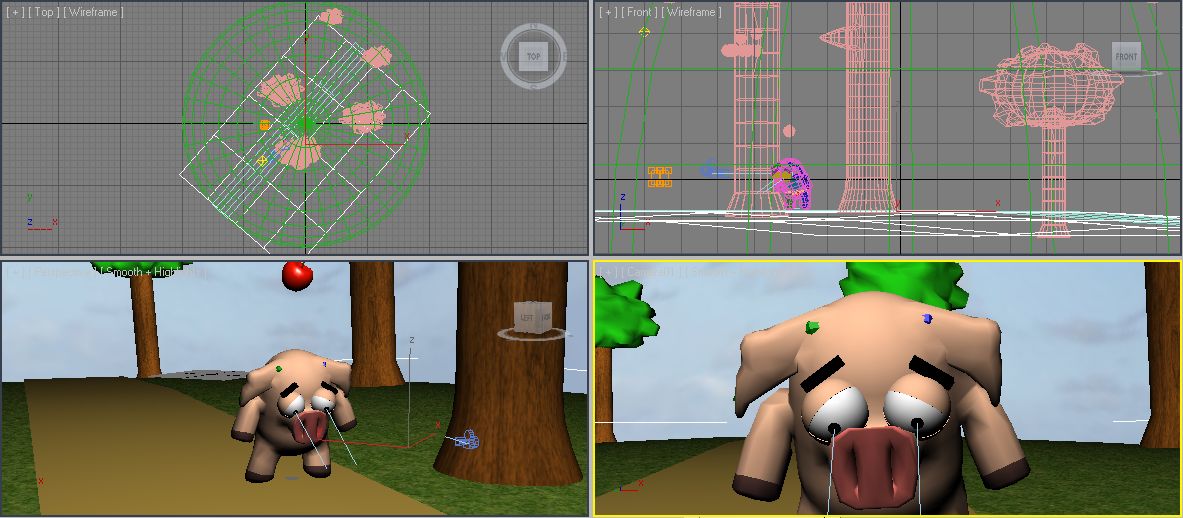
This is a short scene in which Pigham looks sad, before the apple he was after falls off the tree and lands on his head. I simply just manipulated the biped and eyes to make Pigham look sad. When the apple lands on his head, I made him jump slightly, as most people would do if something hard suddenly hit them on the head.
Character Personality:
As I have mentioned before, I believe that emotion is most important in the eyes. As a result, I closed his eyes at an angle and lowered his eye brows to make him look sad. To increase the effect, I made him lower his head and ears slightly in order to make it seem as though he has given up.
When the apple hits him, he suddenly closes his eyes and his eye brows change angles, giving him an angry look. His arms and ears also pop up to make him look alerted.
Camera:
The camera is a close up of his face which strengthens his sad emtions. The camera slowly pans backwards to make it seem like his is becoming smaller, expressing how he currently feels.
Problems:
I had no major problems with this scene.
Scene 7

Animation Procedures:
In this scene, Pigham gets up from hitting his head on the tree, taking a few seconds to regain conciousness. The main problem that I have when it comes to animating, is making a character move without the use of footstep mode. I feel that I am not at that stage where I can confidently animate a character walking fluidly without help. So I was not looking forward to making Pigham get up from the floor and move back to the middle of the path.
Having said that, I think that I managed to pull it off quite successfully. I made him push himself up and then stumble backwards. When people stumble, their movements are all over the place, so I didnt have to worry about making Pigham perfectly walk backwards. Even the part where he spins on one foot kind of works!
In order to get the eyes to move in circles, I just set key frames with them in different positions. I could have used 2 pointers, but I would only have been doing the same thing, only setting the key frames on them rather than the eyes.
Character Personality:
Pigahm has just hit his head quite hard, so understandably, it takes him a little while to fully regain conciousness. As I just mentioned, he stumbles backwards. In order to create this effect, I put a slight spin on the entire biped, as well as individual sections such as the legs. I believe that it creates a convincing effect.
The spinning eyes is also a standard cartoon effect which cearly shows that the character has been hurt and not fully concious. I made sure to give him a blank stare when he snaps out of his confusion in order to convey how he not quite sure what happened.
Camera:
The camera simply follows him from behind to infront of him. I wanted the camera to end up directly infront of him just like the old camera did. This is because I felt that for the very last scene, the camera should follow up exactly where this one ends.
Problems:
As I mentioned above, I had some trouble getting Pigham to get up, but I believe that I successfully pulled it off in the end.
Also, for the final time, I had the bleeding effect problem.
Scene 6

Animation Procedures:
In this scene, Pigham attempts to jump into the tree head first in order to knock the apple down. This scene mainly consisted of editing the biped.
Character Personality:
With the old camera, the audience would have been able to see Pigham jump from one side of the screen to the tree. They would also have been able to see him struggling in the air by waving his arms and legs around and keeping his eye closed. Unfortunately, with the new camera angle, the camera is much closer to the tree. This means that Pigham is only seen literally just before he hits the tree, which reduces the humourous effect of the scene. It still works, I just would have preferred it from the old angle (the reason why the animation was going to be all at one angle was for this particular scene).
When he hits his head on the tree, his eyes fully open and his ears go on end. He also remains completely still, just like some cartoon characters do when they hit their head. Again, reinforcing the cartoony nature of the character, he remains in the same position where he hits his head for a few seconds, before slowly sliding down the tree in the same position. Only as he gets to the bottom of the tree does his body relax.
Camera:
The camera is in the same postition as the previous scene. This is because it increases the dramatic effect of Pigham walking off screen before suddenly reappearing.
Problems:
Once again, I suffered from the bleeding effect. I knew how to fix it, but it just took some time to get him to remain perfectly still between key frames.
Subscribe to:
Posts (Atom)